

this blog post will be a test to see how this feature does in practice.
Earlier this month, atmosphere.community announced that a new WordPress plugin had been released which allowed WordPress sites to automatically sync to the ATProto lexicon via standard.site. For anyone unfamiliar with how ATprotocol works, the PLC (or public ledger of credentials) saves all entries made from your atproto account, which allows you to move hosting providers or self-host while still keeping all of your historic entries. native ATproto long-form text applications like leaflet.pub and pckt.blog allow sync back to the lexicon natively, but to my knowledge, this would be the first time a non-native ATProto application allowed synchronization back to the plc. conceptually, for an open-source junkie like me, seeing a company best known for their work in activitypub start working with a protocol like atproto is akin to a rap and rock fan finding the dem franchize boyz and Korn mashup “Coming Undone Wit It”.
Congrats to @wordpress.org & @pfefferle.org for shipping the first 1.0.0 version of an Atmosphere plugin for WordPress. WordPress posts are published as microblog posts as well as @standard.site long form posts. Read all the other features in the blog post
— Atmosphere Community (@atmosphere.community) May 20, 2026 at 11:54 AM
[image or embed]
before getting into how the plugin operates, i wanted to share a few pertinent topics regarding my feelings for WordPress and, specifically automattic. firstly, and probably most importantly, the current CEO of bluesky is Toni Schneider; a name many will know as a previous ceo of automattic, the for-profit company that owns wordpress.com. schneider replaced jay gruber earlier this year and has been vocal at events like atmosphere conf 2026 about wanting to create an atmosphere that is respectful to all applications under this protocol, not just bluesky. this fact makes it relatively easy to speculate on why automattic has released an official plugin that works with atproto, but the secondary point really brings it home for me: automattic’s lawsuit with wp engine. while the exact lawsuit is verbose, the thing that left a bad taste in my mouth was automattic removing wp engine’s ability to share plugins through wordpress. This makes it difficult to trust anything from automattic or things related to automattic for me, as i’m worried the eventuality will become automattic suing plugin creators for trademark if its felt that an official “automattic” plugin could be making more revenue. I’ve been pretty loud in my last few blog posts about the autoblue plugin, and this current atmosphere plugin feels like automattic’s attempt of making a better “autoblue”. granted, iteration is common in tech and no official statements from anyone at automattic or bluesky has corroborated that feeling…yet. with all of that incredibly dense exposition out of the way, let’s start discussing the atmosphere plugin by automattic.
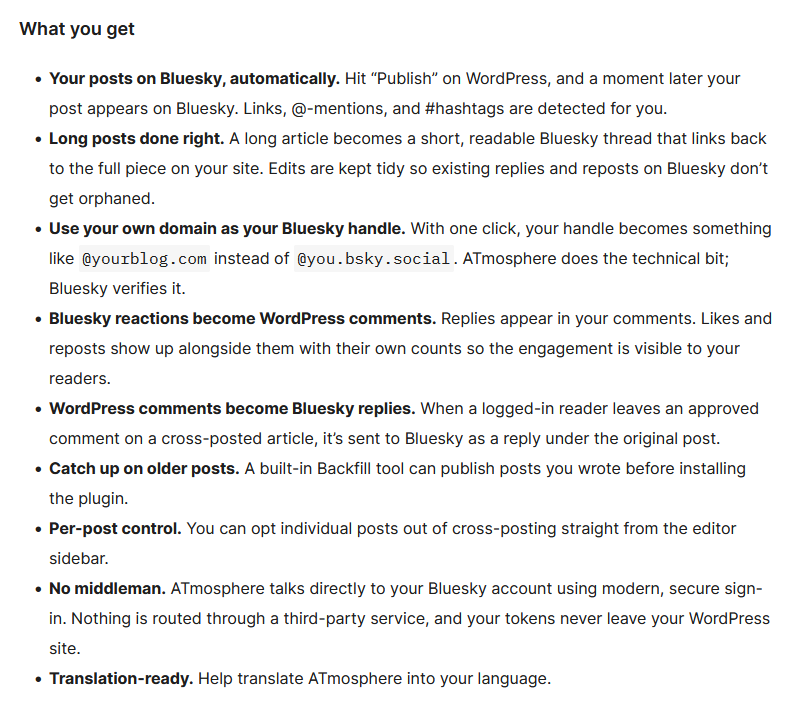
The atmosphere plugin version 1.1.0 is available for free through WordPress and is compatible with WordPress version 6.2 and higher. while configuring the plugin, my concern regarding self-hosted atmosphere accounts was assuaged. not only did it recognize my domain name when authenticating, it used oauth to find the blacksky pds servers and connect, seemingly, without any issues. the oauth feature is actually boasted on the plugin’s homepage, where it states “ATmosphere talks directly to your Bluesky account using modern, secure sign-in. Nothing is routed through a third-party service, and your tokens never leave your WordPress site”.
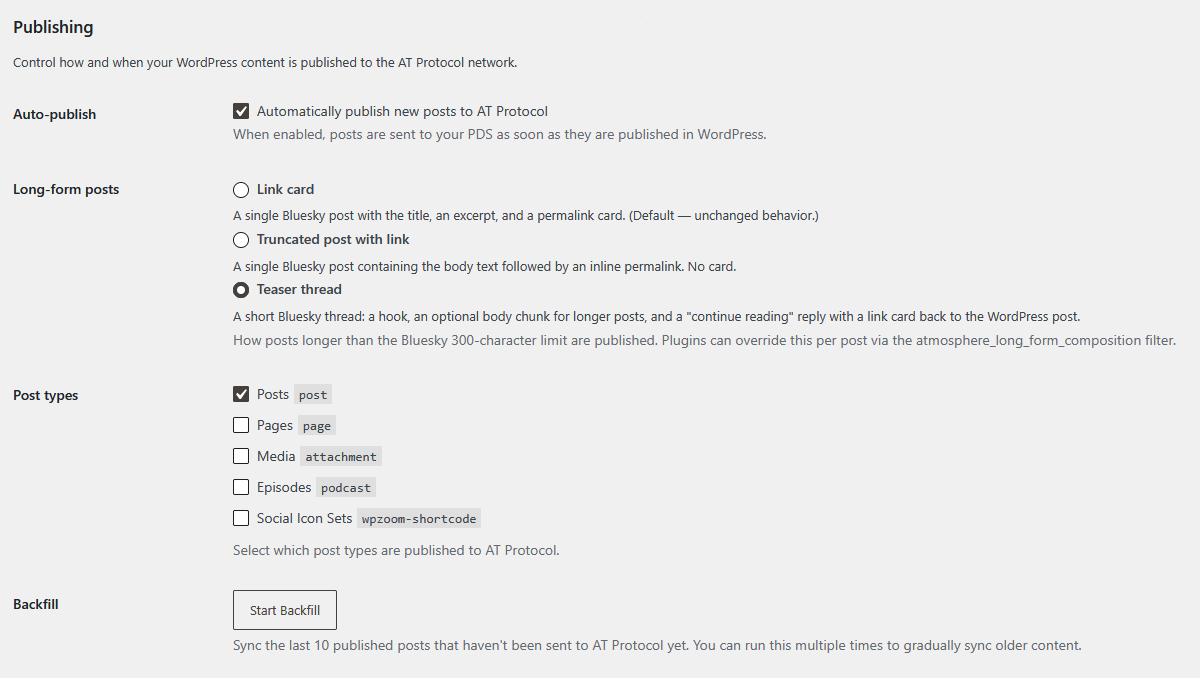
The feature I was most interested in was the “threadable blog posts” which turns your articles into a “short, readable bluesky thread that links back to the full piece on your site”. In complete transparency, this blog post will be a test to see how this feature does in practice. i’ve attached a picture of my current atmosphere plugin settings beneath this paragraph so that any future readers (or podcast listeners) can easily copy my settings for themselves.
update: i tested it and i hate it. I’m moving my settings back to link card feature and will keep it like this for awhile.
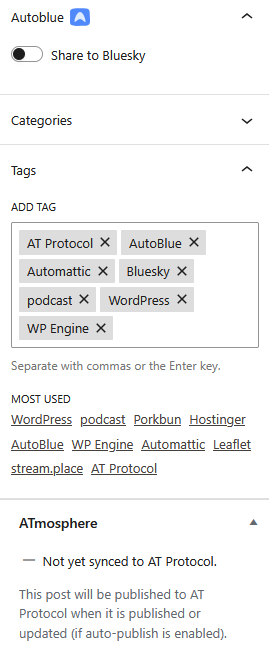
another feature i wanted to talk about was the “per-post control” feature which, by automattic’s own verbiage, is built to allow bloggers to “opt individual posts out of cross-posting straight from the editor sidebar”. This is a feature that autoblue also has, but unlike the ATmosphere plugin: autoblue actually works. While typing this post as a draft, i did not see a feature in the post settings of my post editor that would allow me to enable or disable posting. i’ve tested in a few different browsers (chrome, edge, firefox, opera, and vivaldi) and even upgraded to wordpress 7.0 to see if it was possibly a versioning bug, but the issue still persisted. i’ll keep monitoring the updates to this plugin and see if the issue is addressed in future updates, but for now: it appears this feature isn’t truly viable.
the final feature that has somewhat peaked my interest is the ability to set which type of post is shared on bluesky. i’ve been looking for an opportunity to post pictures or podcast episodes directly on my website while also notifying my audience and this feature provides the ability to do so without having to work with rss or webhooks. i’ll be testing it more later and if you’re subscribed to my rss feed, you’ll probably see a few entries coming up soon!
ultimately, this plugin boasts similar features as autoblue with a few additions, but still hasn’t made its way to becoming my single plugin for posting on the atmosphere just yet. still, its exciting to see atproto expanding to other companies outside of the atmosphere ecosystem. i truly hope it continues and more people, especially other small creators like myself, start moving towards free and open-source solutions like these.

Comments
Join the conversation on Bluesky
few updates i’ve noticed since posting: (1) plugin doesn’t seem to actually grab comments and integrate them natively to the website; i’m still using #AutoBlue to accomplish it 🥲 (2) didn’t recognize or post when i uploaded new media to my site despite me enabling that feature 😔
I’m hoping to add support for standard.site in the next few days 😎
thank you!
Gotta get standard site on your web blog so I can subscribe!!
i just added it via the wordpress atmosphere plugin 😉 its supposed to sync with @standard.site, but if its not: that means @automattic.com has features they need to patch 🫠 for now, my blog is can be subscribed through via sharpiepls.com/blog or sharpiepls.com/feed/mp3 via RSS or podcast apps 😇
Noice!!